Free Respin
For when a buyer wins a free respin.
Breakers Overlays on-screen animations are full-screen graphics you fire with one tap during a card break, such as Free Respin, Stash or Pass and See 3 Take 1, in your colours and with your logo on the card backs.
When a buyer wins a game, make it a moment. One tap from your panel or a Stream Deck key and it plays across your stream.
£19/month or £169/year after your trial · everything included · Last updated: November 2026
 LIVE
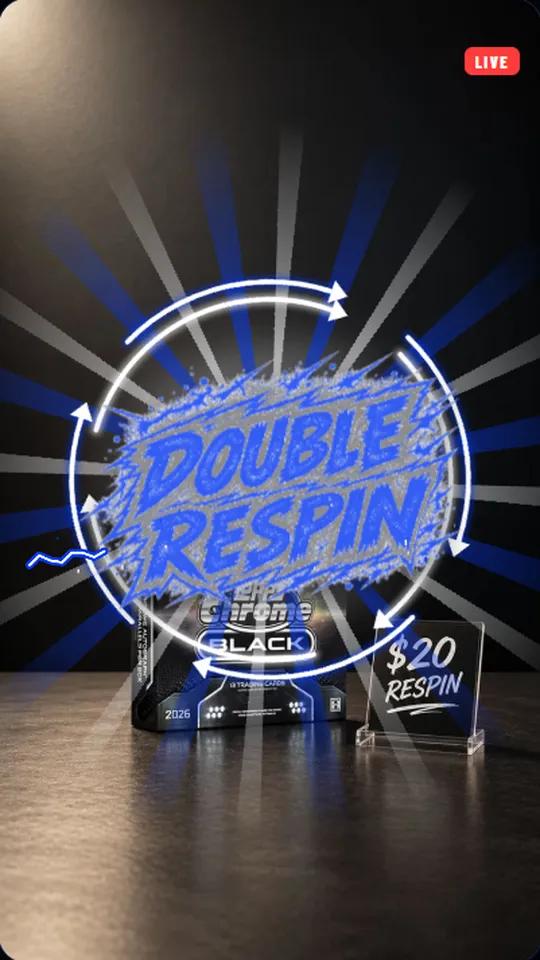
For when a buyer wins a free respin.
Two or three respins, each with its own graphic.
Build the tension before the buyer decides.
Show the cards, then let the buyer pick.
Two cards, one choice.
The cards in the animations carry your logo, and the graphics take your brand colours.
The animation overlay is a single full-screen OBS browser source (1080×1920) on a transparent background. It sits on top of your layout and stays invisible until you fire something. Tap a game in your control panel and the graphic plays over your stream, then clears itself.
Choose how it enters: slide down, slide up, expand or spin in. The graphics use your two brand colours, and the cards show your logo on the back, so every animation looks like part of your stream rather than a generic sticker.
If you use a Stream Deck, copy a link for any animation from your panel and paste it onto a key. There's nothing to install. When OBS reloads a source, old animations don't replay, so a scene switch won't fire a respin by accident. Pair them with the spot list and your facecam frame for a complete layout.
Paste the animation link into OBS once, as a full-screen source above your other overlays.
Choose slide down, slide up, expand or spin in, and your colours are applied automatically.
Tap a game in your panel, or press its Stream Deck key, when a buyer wins.
Free Respin, Double Respin, Triple Respin, Stash or Pass, See 3 Take 1, See 3 Take 2 and See 2 Pick 1.
Yes. Copy a link for any animation from your panel and paste it onto a Stream Deck key. There's nothing to install.
Yes. The graphics take your brand colours, and the cards show your logo on the back.
No. Animations fired before the source loaded don't replay.
No. Every on-screen animation is included in the one plan.
Full screen: one 1080×1920 browser source on a transparent background.
One plan, everything included
Every overlay, every sport, Auto-Claim, on-screen animations and every future update. Start with a 10-day free trial.
The trial takes a card: cancel any time in the first 10 days and you won't be charged.