
A random team break is the classic card break format: buyers buy spots without choosing a team, the teams are handed out at random, and each buyer gets every card from their team that comes out of the box. It's simple for buyers, fair, and fun to watch, which is why it's the format most sports breakers start with. This guide covers how to plan one, run it on Whatnot and present it well on stream.
A note on rules: Whatnot has its own guidelines for breaks, and they change from time to time. Always check Whatnot's current seller rules for breaks before you run one. In particular, Whatnot requires you to use its own built-in randomizer to assign teams; third-party randomizers aren't allowed.
Step 1. Choose the product and the team list
Start with what you're opening. A hobby box or a case of an NFL product breaks naturally into 32 team spots; NBA into 30; MLB into 30; NHL into 32. For football (soccer) products, breaks are often by club for the league the product covers. Check the checklist before you price anything: some teams have far more cards or big rookies than others, which is exactly why random breaks exist, since everyone gets the same chance at the best team.
Decide whether you'll break one box, several boxes or a case, and whether there are any extra spots (some breakers run divisional breaks, with fewer, bigger spots).
Step 2. Price the spots and list the break
Work out the total cost of the product and how many spots you're selling, and set your spot price or auction start so the break makes sense for you and for buyers. Then list the break on Whatnot following its listing rules for breaks, with a clear description: the product, the number of boxes, the number of spots and how teams are assigned.
Write the description so a buyer who joins late understands it in a few seconds. Most break disputes come from buyers misunderstanding what they bought.
Step 3. Set up your board before you go live
Put the full team list on screen before the first spot sells. Viewers should be able to see every team in the break, with logos, so they understand what they're buying into. With Breakers Overlays you pick NFL, NBA, MLB or NHL and every team's logo is already on the board, so this takes seconds. See our guide to showing a spot list on Whatnot.
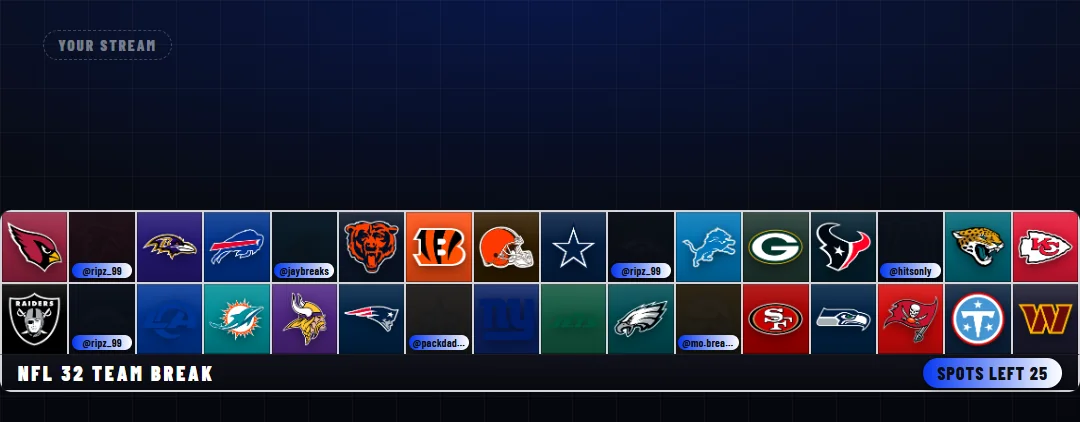
Step 4. Sell the spots
As spots sell, show who has bought in. In a random team break, the spot list starts as a list of buyers rather than teams, and teams are assigned once the break is full, or as each spot sells, depending on how you've set up the randomizer in Whatnot. Either way, keep a running count of spots left on screen; it's the number chat cares about most near the end.
If you use Breakers Overlays, Auto-Claim reads each Whatnot sale and marks the board with the buyer's name and price, so you can keep talking to chat instead of typing.
Step 5. Assign teams with Whatnot's randomizer
Use Whatnot's built-in randomizer to assign the teams. Make the randomizing a moment: show it on screen, read out each result, and give buyers a second to react. Once teams are assigned, every sold spot on your board should show its team and its buyer, so everyone can check theirs.
Breakers Overlays claims Whatnot's randomizer results on your board automatically, and on NBA, NFL, MLB and NHL boards each one plays a team takeover: the team's logo fills the board, then the team name and SOLD @buyer.
Step 6. Run respins and games
Many breakers add games to keep the break lively: a free respin, a double respin, "stash or pass", or "see 3, take 1". Make the rules clear before you start, and run any random element through Whatnot's tools. When a buyer wins one, celebrate it on screen. Breakers Overlays has one-tap on-screen animations for Free Respin, Double Respin, Triple Respin, Stash or Pass, See 3 Take 1, See 3 Take 2 and See 2 Pick 1, which you can fire from your panel or a Stream Deck.
Step 7. Open the product and sort the cards
Open each pack on camera, slowly enough for viewers to see every card, and announce each card's team as you sort it into that buyer's pile. Keep the board visible so buyers can follow along. Big hits deserve a pause: hold the card up to the camera, check it's in focus, and let chat react.
Step 8. Wrap up and ship
When the last pack is open, recap the big hits, thank your buyers and tell them when their cards will ship. Then reset your board for the next break, or load a saved checklist if you're running the same product again.
Presenting a random break so it feels fair
Trust is everything in random breaks. A few habits help: keep the camera on the product from sealed to open; show the randomizer result clearly; keep the board accurate and readable; and never cover the cards with overlays. A board that updates the moment a spot sells shows buyers you're on top of things.
Common questions from buyers
"Which team did I get?" Keep the buyer's name next to each team on the board, so they can check without asking. "How many spots are left?" Keep a count on screen. "What's the best team?" Avoid promising outcomes; the point of a random break is that any team can hit.
Divisional and pick-your-team breaks
Random team breaks aren't the only format. In a divisional break, each spot is a whole division (for example, NFL has eight divisions of four teams), so spots cost more but each buyer gets several teams. In a pick-your-team break, buyers choose a team and pay a price set for that team; popular teams cost more. Both work with the same board: it just shows divisions or named teams instead of random assignments. Whatever the format, explain it clearly in the listing and on stream, and keep the board as the single place buyers check what they own.
Making the board work for you
Breakers Overlays was built around random team breaks: every team logo is built in for NBA, NFL, MLB and NHL, Auto-Claim fills the board from your Whatnot sales and randomizer results, and every sale gets a team takeover. Try it free for 10 days on your next break: see the NFL, MLB and NHL pages for each board.
FAQ
What is a random team break?
A break where buyers buy spots without picking a team, and teams are assigned at random. Each buyer gets every card from their team that comes out of the product.
Can I use my own randomizer on Whatnot?
No. Whatnot requires you to use its built-in randomizer for breaks. Check Whatnot's current seller rules for breaks before you run one.
How many spots are in an NFL random team break?
A full NFL team break has 32 spots, one per team. NBA and MLB have 30, NHL has 32.
What is a respin?
A game where a buyer gets another random assignment, for example a free respin or a double respin. Make the rules clear before the break starts.
How do I show teams and buyers on stream?
With a spot list overlay. Breakers Overlays shows every team logo and the buyer's @name on each sold team, and fills itself from your Whatnot sales.
How do I keep track of which buyer has which team?
Show it on the board. Each sold team should carry the buyer's @name, so buyers can check their own team and you have a record while you sort cards.
Breakers Overlays is a set of live OBS overlays for card breakers on Whatnot, TikTok Live and eBay Live: spot lists, Auto-Claim, on-screen animations and Pokémon hit lists, from one control panel.
£19/month or £169/year, everything included. The trial takes a card: cancel in the first 10 days and you won't be charged.