
Electric
Neon cells with rising sparks and a flicker in your two colours.
The Breakers Overlays spot list is a live OBS overlay that shows every spot in your break, with team logos or player photos, and the buyer's @name on every sold spot, in eight styles you can switch mid-break.
Your viewers want to know what's left and who has what. The spot list answers both at a glance, in a look that matches your stream.
£19/month or £169/year after your trial · everything included · Last updated: November 2026
A tight two-row board that fits under anything.
Neon cells with rising sparks and a flicker in your two colours.
Frosted glass cells with a moving light bloom.
Every team is a chrome trading card, with a big ✕ and the buyer when it sells.
Two clean rows of badges. Understated and sharp.
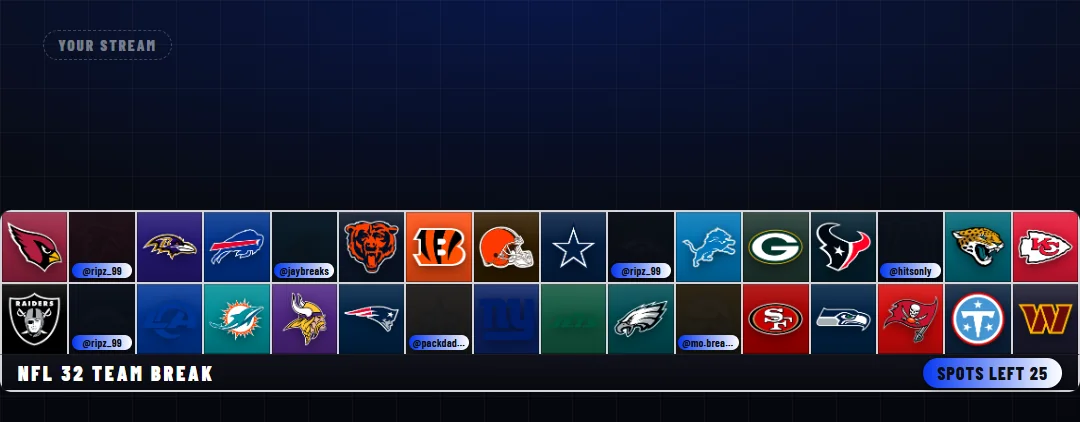
A tight two-row board that fits under anything.
Big badge cards gliding past on a seamless loop.
Every team with who claimed it, scoreboard style.
One scrolling row for the top or bottom of your stream.
Every style shows the buyer's @name on sold spots. On NBA, NFL, MLB and NHL boards, each sale plays a team takeover: a wall of the team's logo, a colour sweep, the logo slamming in with confetti, then the team name and SOLD @buyer. On football, F1, UFC and Custom boards, each sale plays the card-pull reveal: a card with your logo on the back flips round to show the spot and the buyer.
Make it yours with animated effects (Foil, Aurora, Stars and Pulse) in your colours, Holo or Gold, and a choice of fonts. Hide claimed spots if you only want to show what's left; a sold spot gets its moment, then leaves the list. Save boards as checklists and switch between them while you're live.
Spots fill from your Whatnot sales with Auto-Claim, or you can mark them from your panel. Change the style, colours or text whenever you like and the overlay updates on stream in a second or two. It's one OBS browser source on a transparent background, built for vertical 1080×1920 streams.
Choose a sport with built-in team logos, or build a board by search or paste.
Pick one of the eight styles, add an effect and your colours.
Paste the spot list link into OBS once. Style changes show on stream without a refresh.
Eight: Electric, Glass, Chrome, Minimal, Compact, Carousel, Names and Ticker.
Yes. Switch in your panel and the overlay changes on stream in seconds, with no refresh.
Yes. Every sold spot shows the buyer's @name, in every style.
Yes. Hide claimed spots and each sold spot gets its moment, then leaves the list.
Yes. Football, F1 and UFC boards show player, driver and fighter photos; US league boards show team logos.
It's an OBS browser source on a transparent background, sized for a vertical 1080×1920 stream.
One plan, everything included
Every overlay, every sport, Auto-Claim, on-screen animations and every future update. Start with a 10-day free trial.
The trial takes a card: cancel any time in the first 10 days and you won't be charged.
Guides: How to show a spot list on Whatnot · The Whatnot mobile safe area
See every overlay on the homepage or browse break overlays for every sport.