
Fighters with their photos
UFC boards are fighter spot lists. Search for fighters or paste your list and each spot gets the fighter's photo.
Breakers Overlays is a set of live OBS overlays for UFC card breakers on Whatnot, TikTok Live and eBay Live: fighter spot lists with photos, and a card-pull reveal with your logo every time a spot sells.
Your fight card, as a live spot list. Search or paste the fighters you're breaking and their photos are added for you.
£19/month or £169/year after your trial · everything included · Last updated: November 2026
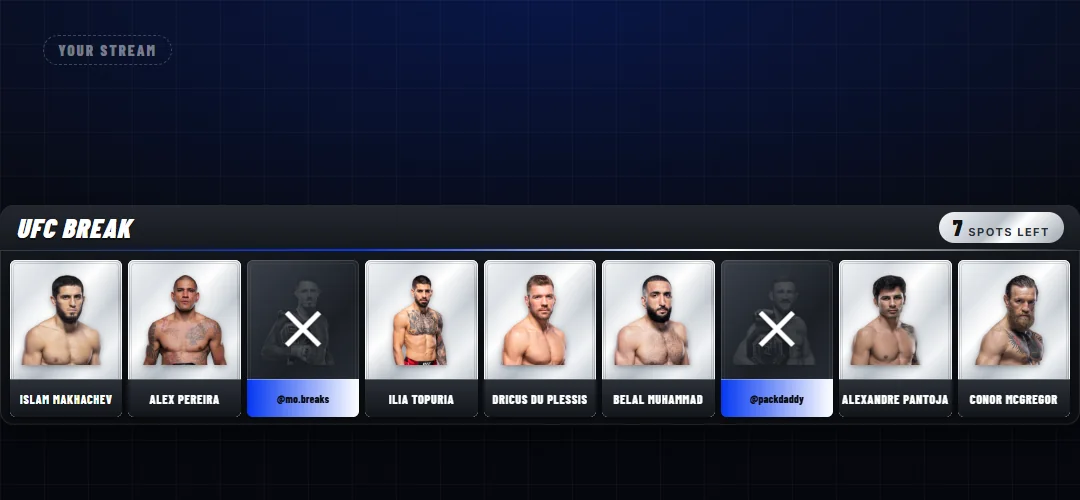
UFC boards are fighter spot lists. Search for fighters or paste your list and each spot gets the fighter's photo.
A card with your logo on the back flips round to show the fighter and the buyer when a spot sells.
Auto-Claim marks each fighter with the buyer's name and the price as the sales come in on Whatnot.
Show the price of the next spot or game in a small price tag overlay, in your colours.
UFC breaks are built around fighters rather than teams, so there is no fixed list to pick from. You choose the fighters: search for them one by one or paste the whole checklist, and Breakers Overlays adds their photos. There are no weight-class presets to get in the way; the board is exactly the fighters you're selling.
As spots sell on Whatnot, Auto-Claim fills them with the buyer's @name and the card-pull reveal gives each one a moment on screen. Add text spots for anything else in the break, and save the board as a checklist for the next event.
The rest of your layout is ready too: a facecam frame, socials, a scrolling ticker, banners in eight textures and on-screen animations like Free Respin, Stash or Pass and See 3 Take 1, with your logo on the card backs. Every overlay takes your logo and colours, and updates on stream within a second or two.
Choose UFC and search or paste the fighters you're breaking. Their photos are added automatically.
Copy the spot list, price tag and any other overlays into OBS as browser sources.
Auto-Claim fills each fighter from your Whatnot sales and the card-pull reveal plays for every one.
Search for fighters or paste your list, and their photos are added automatically.
No. UFC boards are built from the fighters you add, so the board matches exactly what you're breaking.
A card with your logo on the back flips round to show the fighter and the buyer's name, and the spot stays on the board as sold.
Yes. Auto-Claim fills UFC boards from your Whatnot sales with the buyer and the price.
Yes. The price tag overlay shows the price of the next spot or game in a corner of your stream.
Yes. There's no contract. If you cancel in the first 10 days of your trial, you aren't charged.
One plan, everything included
Every sport, every spot list style, Auto-Claim, on-screen animations and every future update. Start with a 10-day free trial.
The trial takes a card: cancel any time in the first 10 days and you won't be charged.
Guides: How to show a spot list on Whatnot · The Whatnot mobile safe area
See every overlay on the homepage, or read who builds Breakers Overlays.