A vertical layout
Every overlay is built for vertical 1080×1920 streams, the shape TikTok viewers watch on their phones.
Breakers Overlays is a set of live OBS overlays for card breakers on TikTok Live: a live spot list with team logos and buyer names, facecam frames, socials and on-screen animations, all in your logo and colours.
Make your TikTok Live breaks look as polished as a broadcast, in the vertical format TikTok viewers watch.
£19/month or £169/year after your trial · everything included · Last updated: November 2026
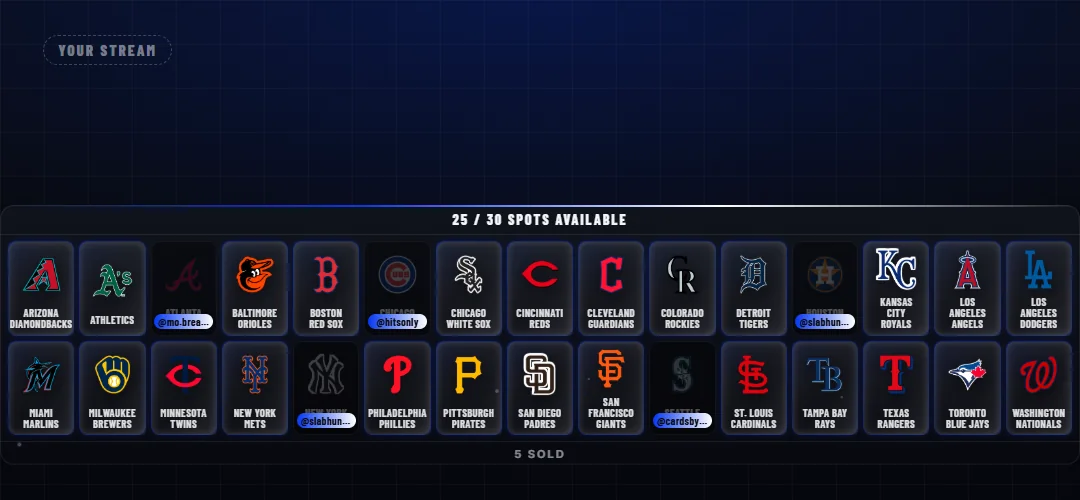
Every overlay is built for vertical 1080×1920 streams, the shape TikTok viewers watch on their phones.
Eight spot list styles with team logos and player photos, and the buyer's @name on every sold spot.
Free Respin, Double Respin, Triple Respin, Stash or Pass, See 3 Take 1, See 3 Take 2 and See 2 Pick 1, fired with one tap.
Your logo and two colours on the spot list, facecam frame, banners, ticker, socials and animations.
If you stream your breaks to TikTok Live from OBS Studio or Streamlabs, Breakers Overlays plugs straight in: each overlay is an OBS browser source on a transparent background, so you add it once and arrange it on your vertical canvas. There's no green screen and nothing to install.
On TikTok Live you mark spots as sold from your control panel, which you can run on your phone or tablet while OBS streams from your computer. Every sold spot shows the buyer's @name, and the team takeover or card-pull reveal gives each sale its moment on screen. Auto-Claim is built for Whatnot, so if you also sell on Whatnot, the same account fills your board from those sales automatically.
The same overlays work for every break you run: NBA, NFL, MLB, NHL, football (soccer), F1, UFC, Custom boards and Pokémon, with hit lists for every set. Change styles, colours or text mid-stream and the overlays update in a second or two, with no OBS refresh.
Sign up, add your logo and two colours and pick your sport. It takes about five minutes.
Paste the overlay links into OBS on a vertical 1080×1920 canvas, and stream to TikTok Live from OBS.
Mark spots as sold from your panel on your phone, and fire on-screen animations with one tap.
Yes. It works with anything you can stream to from OBS, including TikTok Live.
Yes. The overlays are OBS browser sources, so you need OBS Studio (free) or Streamlabs on a Mac or Windows computer.
Auto-Claim is built for Whatnot. On TikTok Live you mark spots as sold from your control panel, which works on your phone.
Yes. Everything is built for vertical 1080×1920 streams.
Yes. Copy a link for any on-screen animation from your panel and paste it onto a Stream Deck key.
One plan with everything included: £19 a month or £169 a year, after a 10-day free trial.
One plan, everything included
Every overlay, every sport, Auto-Claim, on-screen animations and every future update. Start with a 10-day free trial.
The trial takes a card: cancel any time in the first 10 days and you won't be charged.