
Auto-Claim fills your board
When a spot sells on Whatnot, Auto-Claim marks it on your board with the buyer's name and the price, so you never type a name mid-break.
Breakers Overlays is a set of live OBS overlays for card breakers on Whatnot: a spot list that fills itself from your Whatnot sales with the buyer's name and price, on-screen animations, and your logo and colours on every overlay.
Whatnot is where most breakers sell, so that's what Breakers Overlays is built around. Sell exactly as you do now; the overlays keep up with the sales for you.
£19/month or £169/year after your trial · everything included · Last updated: November 2026
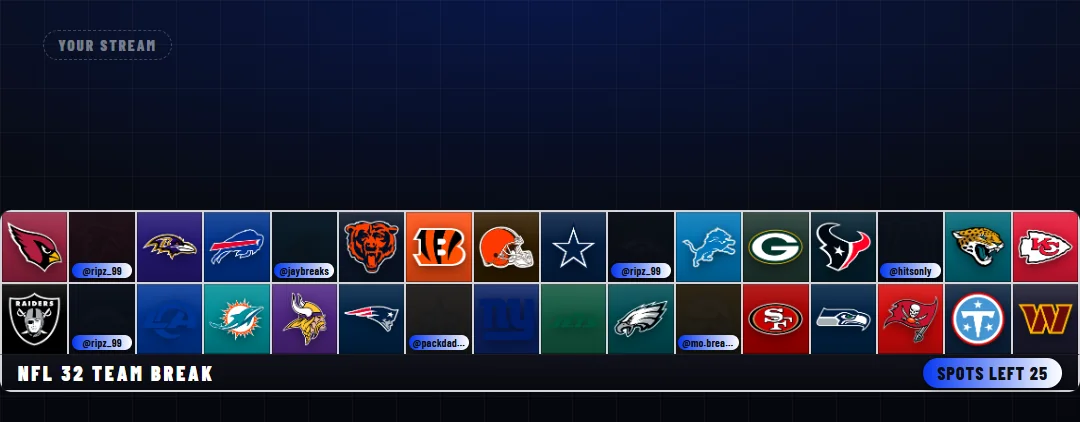
When a spot sells on Whatnot, Auto-Claim marks it on your board with the buyer's name and the price, so you never type a name mid-break.
Run random team breaks with Whatnot's own randomizer as normal. The results are claimed on your board as they come through.
For Whatnot case breaks, a separate mode shows spot prices, sold spots with the buyer's name, an optional discount and giveaway winners, fed by Whatnot.
Whatnot crops about 10% off each side of your stream for phone viewers. The overlays are built for vertical 1080×1920 streams so the important parts stay in view.
Whatnot's app shows your stream, the chat and the buy buttons, but it doesn't put your spot list, your branding or your buyers on screen. To do that, breakers stream from OBS Studio (free) or Streamlabs on a Mac or Windows computer, and add overlays as browser sources. That's what Breakers Overlays gives you: each overlay is one link you paste into OBS once.
Nothing about how you sell changes. You still list and sell through Whatnot, and you still use Whatnot's own randomizer for random team breaks. The overlays read your Whatnot sales and keep the board up to date: Auto-Claim takes the buyer, the spot and the price from the message Whatnot posts when a spot sells, the won bar and your Sold list, and it only claims a spot when it's sure which one is meant.
The rest is up to you: pick one of eight spot list styles, frame your facecam, rotate your socials, scroll a ticker with your break schedule and fire on-screen animations like Free Respin or Stash or Pass from your panel or a Stream Deck. It works for sports and for Pokémon, and if you're running case breaks there's Case Breaks Mode.
Add your logo and two colours, choose your sport and your spots. It takes about five minutes.
Paste each browser source link into OBS once, on a vertical 1080×1920 canvas, and stream to Whatnot from OBS.
Click the Auto-Claim bookmark on your Whatnot show, then break as normal. Spots fill as they sell.
No. Like every pro stream overlay, it runs in OBS Studio or Streamlabs on your computer, and you stream to Whatnot from OBS. You can run the control panel from your phone.
Yes. You sell exactly as you do now and nothing about your listings changes.
It reads the buyer, the spot and the price from the message Whatnot posts when a spot sells, the won bar and your Sold list. It only claims a spot when it's sure which one is meant, and ignores sales from before you switched it on.
Yes, and you should: run random team breaks with Whatnot's own randomizer, and the results are claimed on your board automatically.
Whatnot crops about 10% off each side for phone viewers. Keep the important parts of your layout inside that area; the overlays are built for vertical 1080×1920 streams.
No. Breakers Overlays isn't affiliated with or endorsed by Whatnot. It's an independent tool built for breakers who stream there.
One plan, everything included
Every overlay, every sport, Auto-Claim, on-screen animations and every future update. Start with a 10-day free trial.
The trial takes a card: cancel any time in the first 10 days and you won't be charged.