
In a Pokémon hit-list break, buyers don't buy a team: they buy a hit. Each spot is one of the set's big cards (an ex, an illustration rare, a secret rare), and if that card is pulled during the break, the buyer who owns that spot gets it. It's an exciting format because every pack could be the one, and it suits Pokémon better than team breaks do. This guide covers how to build the hit list, run the break and make every pull feel big on stream.
Check the rules of the platform you're streaming on for breaks and Pokémon sales before you start; they differ between platforms and change over time.
Step 1. Pick the set and the product
Choose the set you're opening and how much product: a booster box, an elite trainer box, a stack of packs, or several boxes. More product means more chances for every hit to be pulled, which matters to buyers, so say clearly in your listing how many packs are being opened.
Step 2. Build the hit list
The hit list is every card that counts as a hit in the set. A common approach is to include every secret rare and every main-set card above Rare, such as ex cards and ACE SPECs. Many breakers pair each special illustration rare with its regular ex in the same spot, so one buyer owns both versions of a Pokémon. Everything else (commons, uncommons, rares) usually goes to the breaker or is given away.
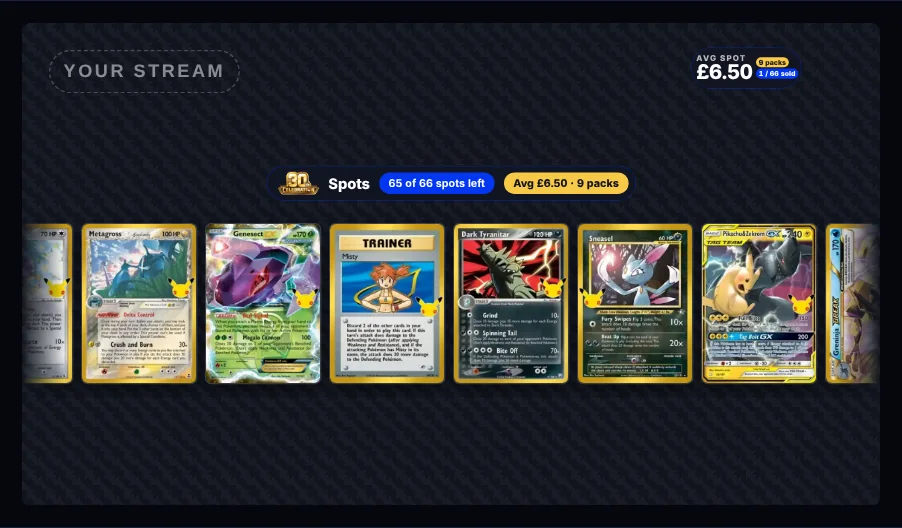
Building this by hand for every new set takes a long time. Breakers Overlays builds the hit list automatically for every set, including Japanese and Simplified Chinese sets, with the real card pictures on each spot, and lets you combine, split, rename or remove spots before you go live.
Step 3. Price the spots
Hit spots aren't all equal: a chase card's spot is worth more than a common ex. Some breakers price spots individually by card, others run them as auctions. Whichever you choose, make your pricing clear, and keep a running average on screen so viewers can see what spots are going for. Breakers Overlays can show a live average spot price, and optionally how many packs that average opens.
Step 4. Put the hit list on stream
Show every hit spot with the real card picture before you start selling, so viewers know exactly what they're buying. As spots sell, add the buyer's name to each one. A board that shows the card art is far more tempting to buy into than a text list of card names.
Step 5. Sell the spots
Fill the board before you open anything. Mark each spot as sold with the buyer's name, or let it fill itself: on Whatnot, Breakers Overlays' Auto-Claim matches each sale to the right hit-list spot. On platforms without a wheel, such as eBay Live, Breakers Overlays has an optional Random spot toggle that assigns spots for you.
Step 6. Open the packs and reveal the pulls
Open packs on camera, one at a time. When a hit comes out, stop: hold it up, show it clearly, and say whose spot it is. Mark it as pulled so the board updates. In Breakers Overlays, a pulled hit glows gold with a Hit! stamp and the buyer's name, and bigger pulls get a full-screen reveal that grows with the size of the pull, from Pulled up to God pack, with the card's value.
A card can come out more than once in a big break; mark it again and the board keeps count.
Step 7. Finish the break
When the last pack is open, recap the pulls, thank your buyers and save the break's stats if your tools support it. Breakers Overlays saves each break's average, total and spots sold, then clears the board for the next one.
Chase boards: a lighter alternative
Not every Pokémon stream needs a full hit list. A chase board puts just your chase cards on screen, gliding across the stream, and you tap a card when it's pulled. It's great for pack openings and smaller breaks, where a full hit list would be too much.
Surprise Sets
Some breakers sell mystery items: graded slabs, sealed packs, vintage cards. A Surprise Set lets you build a "set" from your own item pictures, with quantities and rarities (Floor, Rare, Major). The board shows what's left, reveals play as items are hit, and a counter tracks how many floors have come out since the last major.
Writing a listing buyers understand
Hit-list breaks are newer to many buyers than team breaks, so your listing has to do more work. Say which set and how many packs are being opened, explain that each spot is a named card, say what happens to cards that aren't on the hit list, and say what happens if a card comes out twice. Then repeat the short version on stream every few minutes for people who join late; keeping the board on screen with the card pictures does half of this job for you.
It also helps to say plainly that not every hit will be pulled. In a booster box, some cards on the list may not come out at all, and buyers should know that before they buy.
Japanese and Chinese sets
Japanese and Simplified Chinese sets are popular in breaks because of their pack sizes and card quality. Their hit lists follow the same idea, but the rarities and set lists differ from English sets, so check the set list rather than reusing an English one. Breakers Overlays builds hit lists for Japanese and Simplified Chinese sets too, with their own card pictures.
Making pulls feel big
The best Pokémon streams make every hit a moment. Pause on big pulls. Keep the camera focused on the card, not your face. Show the card's value when it matters. And keep a record of the night's best pulls on screen; Breakers Overlays has a "Tonight's pulls" rail along the bottom of the reveal overlay.
Tools for Pokémon breaks
Breakers Overlays for Pokémon covers all of this in one plan: hit lists for every set, chase boards, pull reveals with card values, Surprise Sets, a live spot average and break stats, with prices in £, $, € or A$. There's a 10-day free trial.
FAQ
What is a Pokémon hit-list break?
A break where each spot is one of the set's hit cards. If that card is pulled, the buyer who owns the spot gets it.
Which cards count as hits?
Commonly every secret rare and every main-set card above Rare, such as ex cards. Many breakers pair each special illustration rare with its regular ex in one spot.
Do I have to build the hit list myself?
Not with Breakers Overlays: it builds the hit list automatically for every set, with the real card pictures.
What happens if the same card is pulled twice?
Mark it again. Breakers Overlays lets a card be marked pulled more than once and keeps count.
Can I run a hit-list break on eBay Live?
Yes. Breakers Overlays has an optional Random spot toggle for platforms without a wheel, such as eBay Live.
How do I show the average spot price?
Keep a running average on screen as spots sell. Breakers Overlays shows a live average spot price, and optionally how many packs that average opens.
Breakers Overlays is a set of live OBS overlays for card breakers on Whatnot, TikTok Live and eBay Live: spot lists, Auto-Claim, on-screen animations and Pokémon hit lists, from one control panel.
£19/month or £169/year, everything included. The trial takes a card: cancel in the first 10 days and you won't be charged.